Table of Contents
Introduction
As noted in the Getting Started
tutorial, the JM2MP format can be used through web services by
utilizing the JM2MP.JS library. This kind of client application or
server integration must use the Node.js
(or compatible) platform and the NPM
package manager.
To install JM2MP.JS as a dependency of your project, you must first
install it:
npm install --save @json-mde/jm2mp
Software Architecture and Components
The JavaScript source code of JM2MP.JS is based on modern
ESM modules.
That means that, as a library, must be imported into other solutions in
this specific way.
The JM2MP.JS library offers a two-level application programming
interface (API). The documentation contained in the module
jm2mp/index explains how to use each level.
Examples of Use
The packages @json-mde/jm2mp-express4
and @json-mde/jm2mp-express5 have been
developed as examples of the combined use of JM2MP.JS as part of the
middleware for
the popular web development framework Express.js.
Due to the changes in the internal architecture of this framework between versions 4 and 5, two different packages are therefore provided, each one adapted to the corresponding version of Express.js. Note that, for practical purposes, version 4 is designed with synchronous components in mind, while version 5 has been adapted to primarily support asynchronous (more modern) components.
# It clones the source code repository in your own computer.
git clone https://github.com/json-mde/JM2MP.JS--Express-v5-Middleware.git MyJm2mpExpress5
cd MyJm2mpExpress5
# It installs all dependencies, (optionally) including also development and optional ones.
npm install --include=dev --include=optional
# It starts the demonstration web server integration JM2MP in it.
npm start
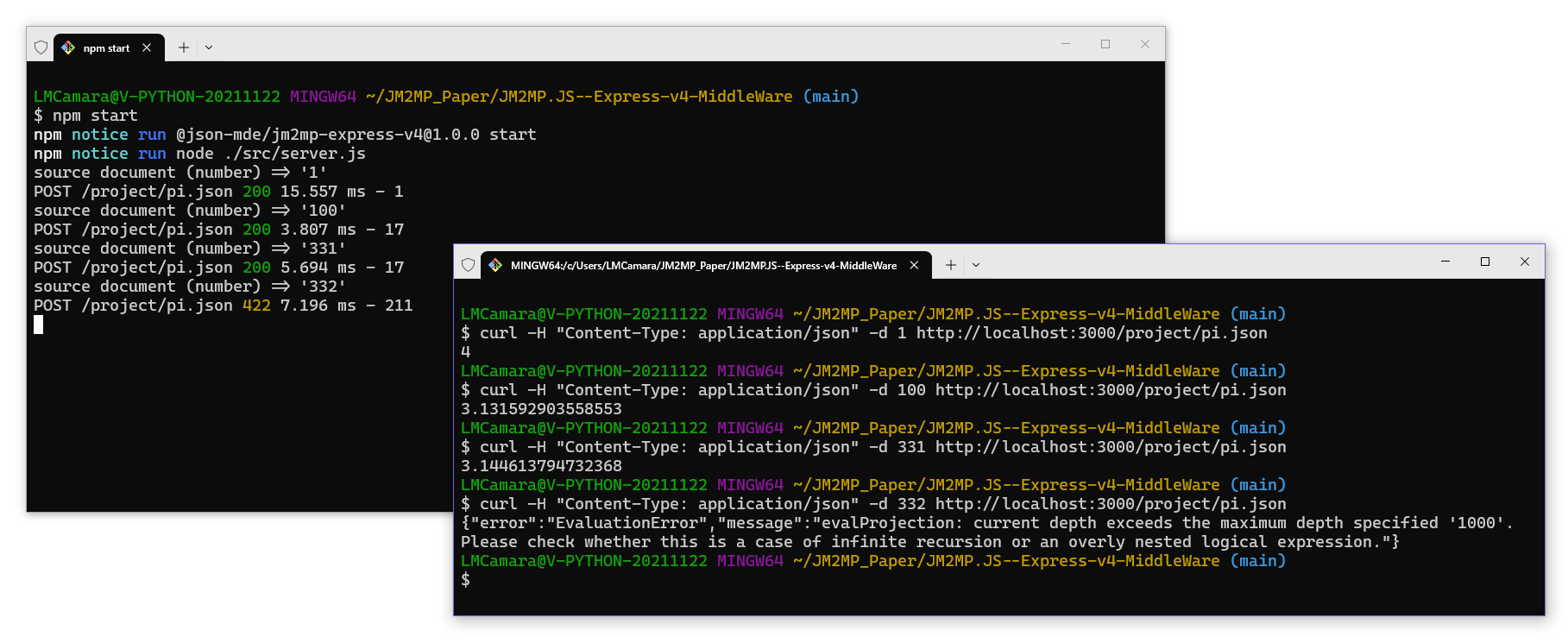
To execute sample web applications or API services, it is usually required to use several interfaces: the former is a shell running the server, the latter would be a web browser or another shell for the client.
Next screen capture shows you how to use the
Express.js v4 JM2MP.JS middleware to execute the
Pi sample projection
using two shell instances, as explained: one for running the
Express.js-based server, and the other one to make requests using the
cURL command line tool.