Table of Contents
Introduction
Apart from the simple examples described in the Combining Operations section from the Native Query Language tutorial, here we will present to more complex examples: Courses and Students and Inventory Management.
Courses and Students
This example of courses and students shows how to generate a report that displays, for each student, their aggregated results over a specific time period, based on the enrollment data for each course.
This section of the tutorial is based on the integration test found in
the file ${JM2MP.JS}/src/test/integration/courses-students.test.js.
Source Document (CS)
{
  "university": "Universidad Nacional de Educación a Distancia (U.N.E.D.)",
  "period": "2026-Q1",
  "passing_grade": 5.0,
  "courses": {
    "ALG-101": {
      "title": "Linear Algebra",
      "credits": 4,
      "enrollments": [
        { "student": "Luis María",   "grade": 7.5 },
        { "student": "Inés",         "grade": 4.0 },
        { "student": "Elena",        "grade": 8.5 },
        { "student": "José Antonio", "grade": null }
      ]
    },
    "FPROG-201": {
      "title": "Functional Programming",
      "credits": 6,
      "enrollments": [
        { "student": "Luis María",   "grade": 9.0 },
        { "student": "Elena",        "grade": 6.5 },
        { "student": "José Antonio", "grade": 5.5 }
      ]
    },
    "DB-301": {
      "title": "Databases",
      "credits": 9,
      "enrollments": [
        { "student": "Inés",         "grade": 7.0 },
        { "student": "Elena",        "grade": 3.0 },
        { "student": "José Antonio", "grade": 8.0 }
      ]
    }
  }
}
Projection Document (CS)
{
  // The $schema and $options metadata.
  "$schema": "https://json-mde.tech/schemas/jm2mp/",
  "$options": {
    "$version": "1.0",
    "$default-query-language": "native",
    "annotations": "Projection document for 'courses and students' example."
  },
  // The root template.
  "$": {
    // Literal property: copy its value as is.
    "university": { "$op": "get", "$path": "$.university" },
    // Literal property: copy its value as is.
    "period": { "$op": "get", "$path": "$.period" },
    // Literal property: create the name but project its values (foldObj).
    "students": {
      // Second pass: calculate aggregated marks
      // for each student using first pass result.
      "$op": "foldObj",
      "$over": {
        // First pass: gets courses and enrollments for each student.
        "$op": "foldObj",
        "$over": { "$op": "get", "$path": "$.courses" },  // Starting at root context.
        "$init": {},  // Empty object as neutral element; see insert in step.
        "$step": {
          // It gets the credits for each course using an alias.
          "$op": "let",
          "$bindings": {
            "credits": { "$op": "get", "$path": "@.value.credits" }
          },
          "$in": {
            // It iterates for each courses' enrollments.
            "$op": "foldArr",
            "$over": { "$op": "get", "$path": "@.value.enrollments" },
            "$init": { "$op": "get", "$path": "@.acc" },
            "$step": {
              // Null grades means that such enrollment is ignored.
              "$op": "if",
              "$cond": {
                "$op": "eq",
                "$left":  { "$op": "get", "$path": "@.item.grade" },
                "$right": null
              },
              "$then": { "$op": "get", "$path": "@.acc" },
              "$else": {
                // Numeric grades means that such enrollment counts toward student's marks.
                "$op": "let",
                "$bindings": {
                  "student": { "$op": "get", "$path": "@.item.student" },
                  "grade":   { "$op": "get", "$path": "@.item.grade" },
                  "accI":    { "$op": "get", "$path": "@.acc" }
                },
                "$in": {
                  // Inner scope to accumulate (count and sum) by student's name,
                  // outer scope for final statistics per student.
                  "$op": "let",
                  "$bindings": {
                    "previous_step": {
                      "$op": "lookup",
                      "$key": { "$op": "get", "$path": "%student" },
                      "$in":  { "$op": "get", "$path": "%accI" }
                    }
                  },
                  "$in": {
                    // Ad-hoc accumulator object for each student with three properties:
                    // passing_credits, sum_of_grades, and enrolled_courses.
                    // Each iteration's step accumulates its values.
                    // Remember that {...{k:old},...{k:new}} => {...,k:new,...}
                    "$op": "insert",
                    "$key": { "$op": "get", "$path": "%student" },
                    "$value": {
                      // %accI[%student].passing_credits += (
                      //   ( %accI[%student].grade ) >= $.passing_grade )
                      //   ? %credits
                      //   : 0 );
                      "passing_credits": {
                        "$op": "add",
                        "$left": {
                          "$op": "coalesce",
                          "$value": {
                            "$op": "lookup",
                            "$key": "passing_credits",
                            "$in": { "$op": "get", "$path": "%previous_step" }
                          },
                          "$default": 0
                        },
                        "$right": {
                          "$op": "if",
                          "$cond": {
                            "$op": "gte",
                            "$left":  { "$op": "get", "$path": "%grade" },
                            "$right": { "$op": "get", "$path": "$.passing_grade" }
                          },
                          "$then": { "$op": "get", "$path": "%credits" },
                          "$else": 0
                        }
                      },
                      // %accI[%student].sum_of_grades +=
                      //   ( %previous_step[%student].sum_of_grades ?? 0 ) ;
                      "sum_of_grades": {
                        "$op": "add",
                        "$left": {
                          "$op": "coalesce",
                          "$value": {
                            "$op": "lookup",
                            "$key": "sum_of_grades",
                            "$in":  { "$op": "get", "$path": "%previous_step" }
                          },
                          "$default": 0
                        },
                        "$right": { "$op": "get", "$path": "%grade" }
                      },
                      // %accI[%student].enrolled_courses +=
                      //   ( %previous_step[%student].grade ? 1 : 0 );
                      "enrolled_courses": {
                        "$op": "add",
                        "$left": {
                          "$op": "coalesce",
                          "$value": {
                            "$op": "lookup",
                            "$key": "enrolled_courses",
                            "$in":  { "$op": "get", "$path": "%previous_step" }
                          },
                          "$default": 0
                        },
                        "$right": 1
                      }
                    },
                    "$into": { "$op": "get", "$path": "%accI" }
                  }
                }
              }
            }
          }
        }
      },
      // The final resultant value will be an object,
      // initially empty as neutral element (foldObj), which
      // keys will be the name of each student.
      "$init": {},
      // For each student of first pass, in this second pass
      // we calculate the average marks.
      "$step": {
        // For each student from first pass,
        // it calculates their average marks.
        "$op": "insert",
        "$key": { "$op": "get", "$path": "@.key" },
        "$value": {
          "passing_credits": { "$op": "get", "$path": "@.value.passing_credits" },
          "sum_of_grades": { "$op": "get", "$path": "@.value.sum_of_grades" },
          "enrolled_courses": { "$op": "get", "$path": "@.value.enrolled_courses" },
          "average_grade": {
            "$op": "div",
            "$left":  { "$op": "get", "$path": "@.value.sum_of_grades" },
            "$right": { "$op": "get", "$path": "@.value.enrolled_courses" }
          }
        },
        "$into": { "$op": "get", "$path": "@.acc" }
      }
   }
  }
}
The equivalent in a database environment to such projection_ would be an SQL query similar to:
SELECT
  U.Name AS "University",
  U.Period AS "Period",
  S.Name AS "Student",
  SUM( CASE WHEN E.Grade >= U.Passing_Grade
            THEN C.Credits
            ELSE 0.00
            END ) AS "Passing_Credits",
  SUM( E.Grade ) AS "Sum_of_Grades",
  COUNT( E.Grade ) AS "Enrolled_Courses",
  AVG( E.Grade ) AS "Average_Grade"
FROM
  Students AS S
  LEFT JOIN
  Enrollments AS E
  ON ( S.Id = E.Student )
  INNER JOIN
  Courses AS C
  ON ( E.Course = C.Code )
  INNER JOIN
  University AS U
  ON ( C.University = U.Id )
WHERE
  ( E.Grade IS NOT NULL )
GROUP BY
  S.Id
ORDER BY
  S.Id ASC
Using a JavaScript script, the equivalent source code of the projection would be like:
const all_enrollments =
    Object.entries(source_document.courses)
        .map( ([course_name,course_info]) => (
                course_info.enrollments
                            .map( (enrollment)=>({
                                    course:course_name,
                                    title:course_info.title,
                                    credits:course_info.credits,
                                    student:enrollment.student,
                                    grade:enrollment.grade
                                    }) )
                )
        )
        .flat();
const expected_resultant_document = {
    university: source_document.university,
    period: source_document.period,
    students: {},
};
all_enrollments.forEach( (enrollment) =>
{
  if (!Object.hasOwn(expected_resultant_document.students, enrollment.student))
  {
    expected_resultant_document.students[enrollment.student] = {
        passing_credits: 0,
        sum_of_grades: 0,
        enrolled_courses: 0,
        average_grade: 0
    };
  }
  if ( enrollment.grade >= source_document.passing_grade) {
    expected_resultant_document.students[enrollment.student].passing_credits += enrollment.credits;
  }
  if ( enrollment.grade ) {
    expected_resultant_document.students[enrollment.student].sum_of_grades += enrollment.grade;
    expected_resultant_document.students[enrollment.student].enrolled_courses += 1;
  }
});
Object.keys(expected_resultant_document.students).forEach( (student) =>
{
  const current_student = expected_resultant_document.students[student];
  if ( current_student.enrolled_courses > 0 ) {
    current_student.average_grade = ( current_student.sum_of_grades / current_student.enrolled_courses ) ;
  }
});
Resultant Document (CS)
The resultant document obtained is presented below:
{
  "university": "Universidad Nacional de Educación a Distancia (U.N.E.D.)",
  "period": "2026-Q1",
  "students": {
    "Elena": {
      "passing_credits":  10,
      "sum_of_grades":    18,
      "enrolled_courses":  3,
      "average_grade":     6
    },
    "Inés": {
      "passing_credits":   9,
      "sum_of_grades":    11,
      "enrolled_courses":  2,
      "average_grade":     5.5
    },
    "Luis María": {
      "passing_credits":  10,
      "sum_of_grades":    16.5,
      "enrolled_courses":  2,
      "average_grade":     8.25
    },
    "José Antonio": {
      "passing_credits":  15,
      "sum_of_grades":    13.5,
      "enrolled_courses":  2,
      "average_grade":     6.75
    }
  }
}
Inventory Management
This example involves an inventory management and shows how to generate a report that displays, for each stored product, some statistics about their inventory quantity, individual price, and grouping by category.
This section of the tutorial is based on the integration test found
in the file ${JM2MP.JS}/src/test/integration/inventory.test.js.
Source Document (IM)
{
  "store" : "Madrid-01",
  "threshold" : 10,  // Critical threshold for replenishment (or reorder point).
  "products" :
  {
    "SKU-A100" :
    {
      "name" :     "Mechanical Keyboard",
      "category" : "peripheral",
      "stock" :    45,
      "price" :    89.90
    },
    "SKU-A101" :
    {
      "name" :     "Wireless Mouse",
      "category" : "peripheral",
      "stock" :    8,
      "price" :    35.00
    },
    "SKU-B200" :
    {
      "name" :     "Monitor 27 inches",
      "category" : "screen",
      "stock" :    12,
      "price" :    320.00
    },
    "SKU-B201" :
    {
      "name" :     "Monitor 32 inches",
      "category" : "screen",
      "stock" :    3,
      "price" :    480.00
    },
    "SKU-C300" :
    {
      "name" :     "Webcam HD",
      "category" : "peripheral",
      "stock" :    0,
      "price" :    65.00
    },
    "SKU-D400" :
    {
      "name" :     "Bluetooth earphones",
      "category" : "audio",
      "stock" :    25,
      "price" :    120.00
    }
  }
}
Projection Document (IM)
The JM2MP projection document used to transform the
source document into the resultant document is presented below.
The projection document contains comments explaining the main steps,
so it should be considered
JSONC syntax
rather than pure JSON; if you wish to use it in JM2MP.JS, you must
first remove the comments or convert the syntax (see
How to Project Other Usual Document Formats
tutorial for instructions).
{
  // The $schema and $options metadata.
  "$schema": "https://json-mde.tech/schemas/jm2mp/",
  "$options": {
    "$version": "1.0",
    "$default-query-language": "native",
    "annotations": "Projection document for 'inventory' example."
  },
  // The root template.
  "$" :
  {
    // Store: literal copy.
    "store": { "$op": "get", "$path": "$.store" },
    // Total inventory value.
    "total_inventory_value": {
      "$op": "foldObj",
      "$over": { "$op": "get", "$path": "$.products" },
      "$init": 0,
      "$step": {
        "$op": "add",
        "$left": { "$op": "get", "$path": "@.acc" },
        "$right": {
          "$op": "mul",
          "$left":  { "$op": "get", "$path": "@.value.stock" },
          "$right": { "$op": "get", "$path": "@.value.price" }
        }
      }
    },
    // Products below the critical threshold.
    "products_below_critical_threshold": {
      "$op": "foldObj",
      "$over": { "$op": "get", "$path": "$.products" },
      "$init": {},
      "$step": {
        "$op": "if",
        "$cond": {
          "$op": "lte",
          "$left":  { "$op": "get", "$path": "@.value.stock" },
          "$right": { "$op": "get", "$path": "$.threshold" }
        },
        "$then": {
          "$op": "insert",
          "$key": { "$op": "get", "$path": "@.key" },
          "$value": {
            "name":  { "$op": "get", "$path": "@.value.name"  },
            "stock": { "$op": "get", "$path": "@.value.stock" }
          },
          "$into": { "$op": "get", "$path": "@.acc" }
        },
        "$else": { "$op": "get", "$path": "@.acc" }
      }
    },
    // Units in stock, per category (aggregated).
    "stock_per_category": {
      "$op": "foldObj",
      "$over": { "$op": "get", "$path": "$.products" },
      "$init": {},
      "$step": {
        "$op": "insert",
        "$key": { "$op": "get", "$path": "@.value.category" },
        "$value": {
          "$op": "add",
          "$left": {
            "$op": "coalesce",
            "$value": {
              "$op": "lookup",
              "$key": { "$op": "get", "$path": "@.value.category" },
              "$in":  { "$op": "get", "$path": "@.acc" }
            },
            "$default": 0
          },
          "$right": { "$op": "get", "$path": "@.value.stock" }
        },
        "$into": { "$op": "get", "$path": "@.acc" }
      }
    }
  }
}
Resultant Document (IM)
The resultant document that was obtained is presented below:
{
  // Store identification.
  "store": "Madrid-01",
  // Total inventory value.
  "total_inventory_value": 12605.5,
  // Products below its critical threshold.
  "products_below_critical_threshold":
  {
    "SKU-A101":
    {
      "name"  : "Wireless Mouse",
      "stock" : 8
    },
    "SKU-B201":
    {
      "name"  : "Monitor 32 inches",
      "stock" : 3
    },
    "SKU-C300":
    {
      "name"  : "Webcam HD",
      "stock" : 0
    }
  },
  // Units in stock, per category.
  "stock_per_category":
  {
    "peripheral" : 53,
    "screen"     : 15,
    "audio"      : 25
  }
}
Calculating Pi Recursively
The projection document contains the Gregory-Liebniz (or Madhava-Leibniz) Series formula to calculate an approximation of the number Pi (π) in a recursive manner.
Source Document (Pi)
The source document just contains the (natural) number of iterations that will be calculated:
331
Due to the recursive nature of the projection document and the default
maximum limit of logical depth for template commands of 1.000 (see
MaxDepth), this number
of iterations must be between 1 and 331.
Projection Document (Pi)
The projection document is actually the formula to calculate the
Gregory-Liebniz (or Madhava-Leibniz) Series
written in JM2MP syntax:
{
  "$schema": "https://github.json-mde.tech/schemas/jm2mp/1.0.0/JM2MP-v1.0.0--JSON-Schema-Draft-2020-12.json",
  "$options": {
    "$version": "1.0",
    "$default-query-language": "native",
    "$annotations": "The _projection document_ contains the [Gregory-Liebniz (or Madhava-Leibniz) Series](https://www.kirupa.chat/p/life-of-pi-calculating-its-value) formulae to calculate an approximation of number [Pi (π)](https://developer.mozilla.org/en-US/docs/Web/JavaScript/Reference/Global_Objects/Math/PI) in a recursive manner."
  },
  "$": {
    "$op": "mul",
    "$left": 4,
    "$right": { "$op": "call",
                "$ref": "Pi",
                "$at": 0 }
  },

  "Pi": {
    "$op": "if",
    "$cond": {
      "$op": "lt",
      "$left":  { "$op": "get", "$path": "@" },
      "$right": { "$op": "get", "$path": "$" }
    },
    "$then": {
      "$op": "sub",
      "$left": { "$op": "div",
                 "$left": 1,
                 "$right": { "$op": "add",
                             "$left": { "$op": "mul",
                                        "$left": 2,
                                        "$right": { "$op": "get", "$path": "@" } },
                             "$right": 1 }
      },
      "$right": { "$op": "call",
                  "$ref": "Pi",
                  "$at": { "$op": "add",
                           "$left": { "$op": "get", "$path": "@" },
                           "$right": 1 }
      }
    },
    "$else": 0
  }
}
Resultant Document (Pi)
3.144613794732368
A Note of Caution
Although it is technically possible, given the versatility and
capabilities of the JM2MP format, the truth is that this is not the
optimal approach for running processes that involve high computational
demands.
By default, the MaxModules
and MaxDepth arguments
have been defined as a protective mechanism to prevent that an
inappropriate or malicious projection document will exhaust all the
processor or memory resources on the device running JM2MP.JS.
However, it is possible to modify the parameters of the runtime environment itself to set a different value that increases or decreases the environment’s assigned resources.
For example, with the default value for MaxDepth set to 1,000, this
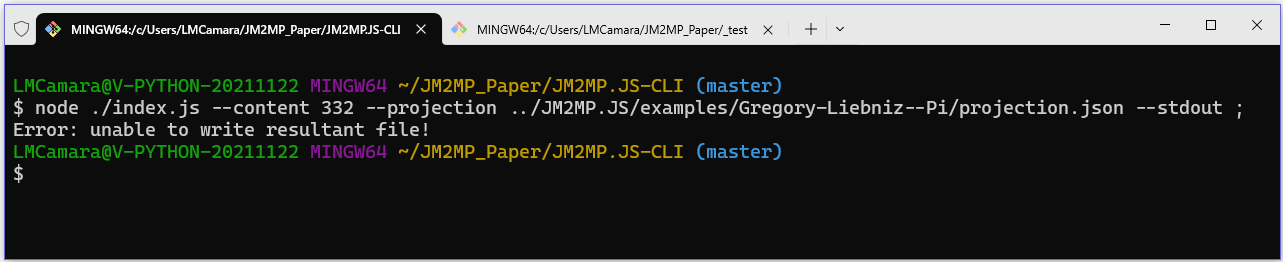
example only allows 331 iterations before reaching that limit. If you
increase the number of iterations without allowing a greater depth, an
EvaluationError will occur
during execution.
As you increase the MaxDepth configuration value of JM2MP.JS, there
will come a point where the runtime environment will also fail to
complete the projection because it will have run out of memory before
finishing it. To address this issue, you will also need to increase the
runtime environment's working memory. In the case of
Node.js' memory, this can
be done by configuring the underlying
V8 JavaScript Engine,
as discussed in
Learn Node.js: Understanding and Tuning Memory.
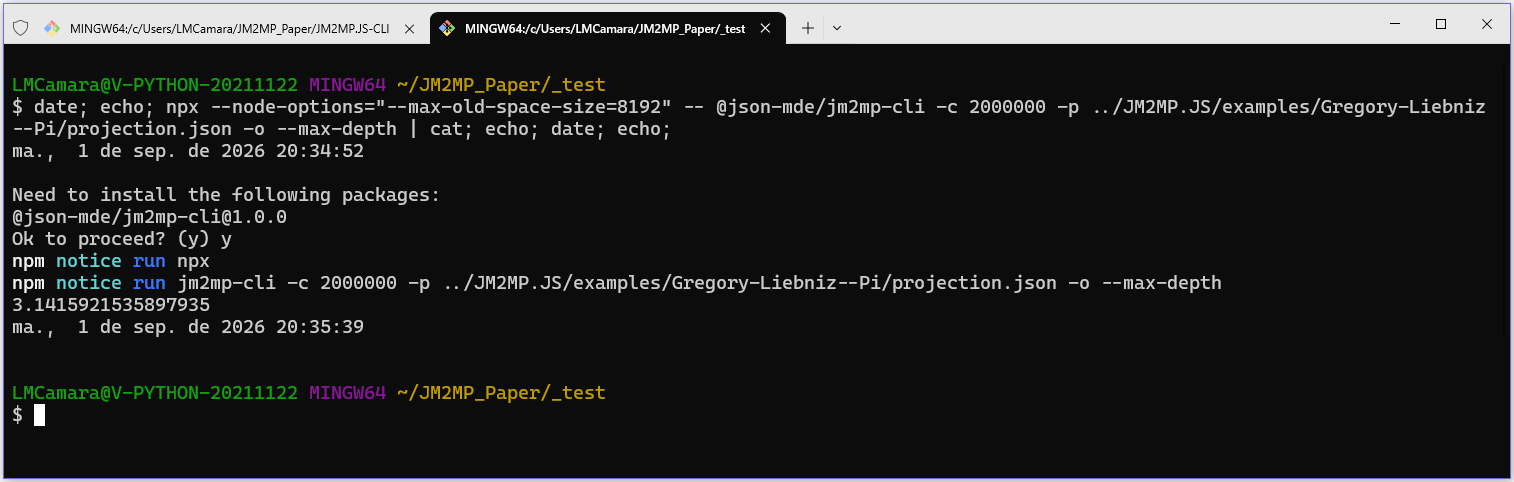
Using the shell, if you execute the
NPX
command, you can configure the
Node.js' V8 Engine
execution by setting the --max-old-space-size value in the
--node-options parameter.
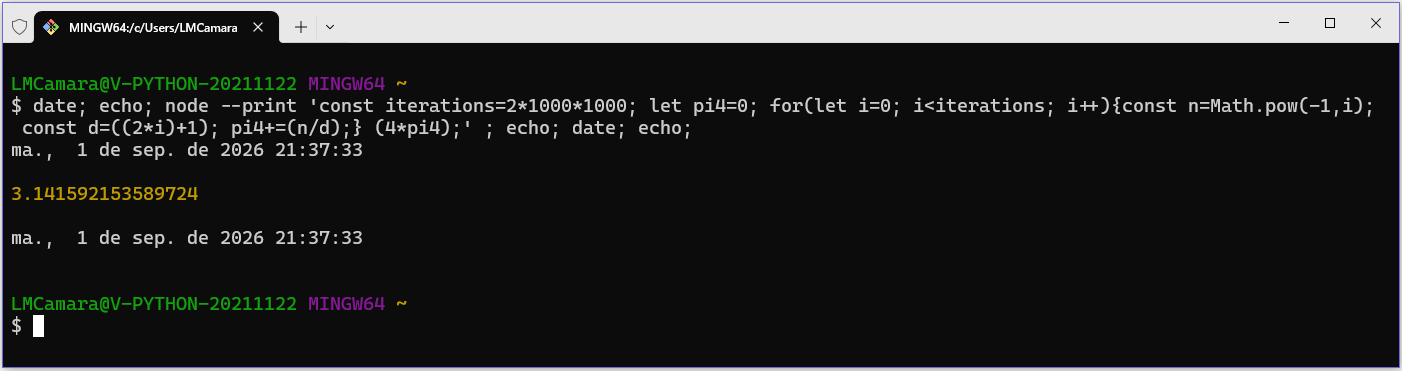
For example, during our benchmark tests, by configuring 8GB of memory,
we were able to run 2,000,000 iterations, obtaining a precision for
Pi of 3.1415921535897935 in 47 seconds (compared to the virtually
instantaneous execution time of the JavaScript-based solution). To do
this, we used the following command line:
npx --node-options="--max-old-space-size=8192" -- \
    @json-mde/jm2mp-cli \
      -c 2000000 \
      -p ../Examples/Pi/projection.json \
      -o \
      --max-depth \
| cat ;