Table of Contents
Introduction
As noted in the Getting Started
tutorial, the JM2MP format can be used directly on web pages by
utilizing the JM2MP.JS library through various content delivery networks
(CDN) solutions, or even the source code published on
GitHub.
Direct use via GitHub's Raw User Content is not recommended, since these websites throttle all requests they receive and, when the number of requests becomes excessive, they block access.
On the other hand, using content delivery networks such as jsDelivr is an easy and high-performance solution.
Software Architecture and Components
The JavaScript source code of JM2MP.JS is based on modern
ESM modules.
That means that, as a library, must be imported into other solutions in
a specific way.
The jsDelivr's documentation
is an excellent starting point for learning not only how to integrate
any existing package, such as JM2MP.JS, into your own solution, but
also how to publish your solution so that others can integrate it into
theirs.
Examples of Use
The JM2MP-JS-WWW directory offers two
different examples about how to integrate JM2MP.JS into web pages:
Static Example (CDN)
The source code of the Static Example (CDN)
shows how easy it is to integrate the JavaScript code from the JM2MP
library into an HTML web page.
Basically, it involves creating an ESM module in a separate file and calling it from the HTML page.
Readers should keep in mind that using ESM modules requires meeting certain conditions. The most notable difference from traditional scripts (now called Common JavaScript, or CSJ for short) is that each module has its own scope, and any element intended for use outside the module ust first be exported.
Interactive Example
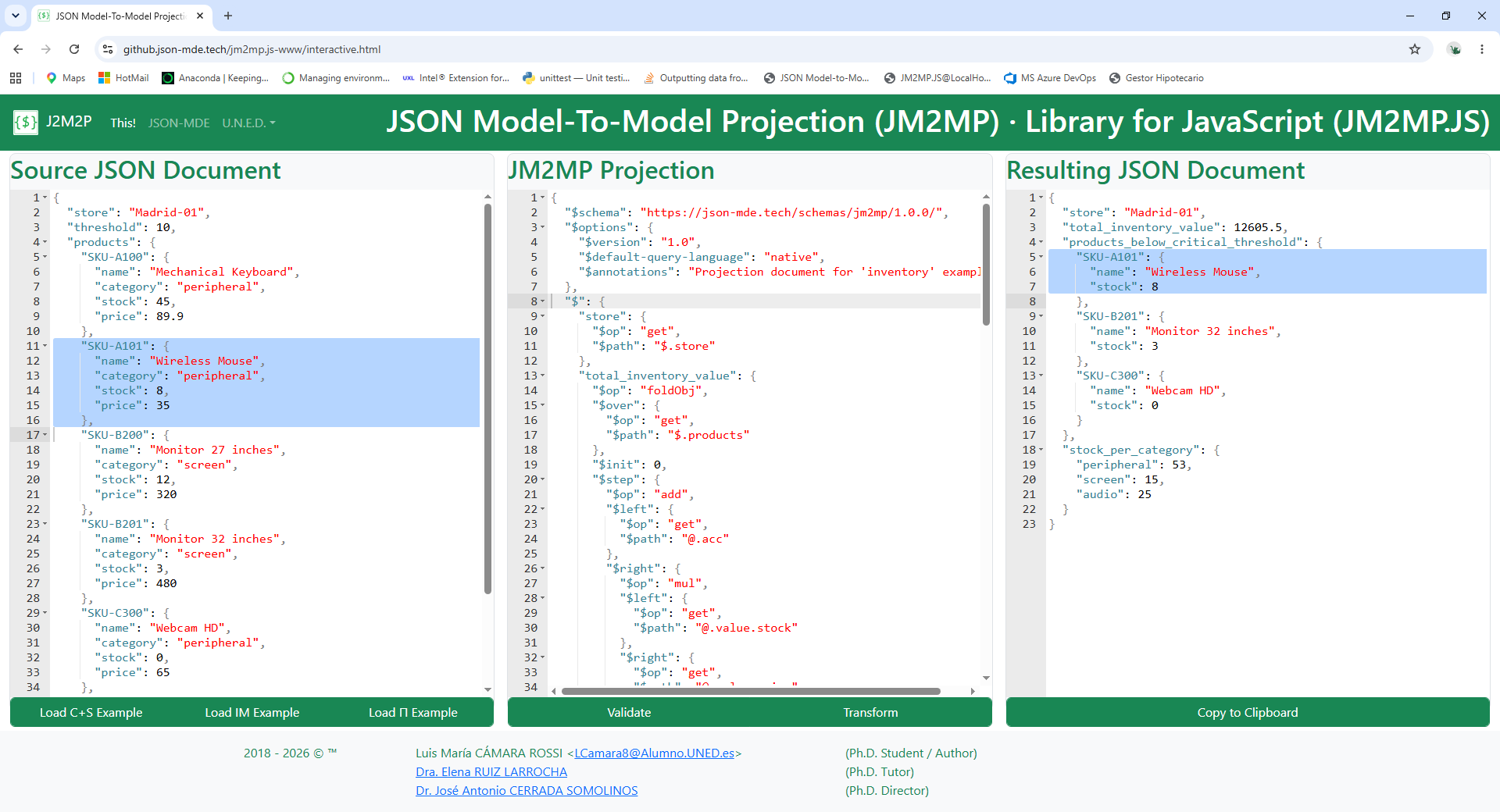
The Interactive Example is a comprehensive example in HTML format that allows you to edit both the source document and the projection document on a single web page, as well as validate and execute the projection on the source and directly obtain the resultant document.
Furthermore, thanks to the use of the Ace9 web-based source code editor, the edited documents feature both syntax highlighting and real-time syntax validation (JSON in all cases).
Due to the complexity of the source code editor, this example may need to be viewed on a computer to be fully functional, rather than on mobile devices.
For the user's convenience, this
Interactive Example includes buttons
to immediately load the three main examples used throughout the JM2MP
documentation:
courses and students,
inventory management, and
calculating Pi (π) recursively.
Please refer to the Examples tutorial for more details about each one.